Every morning, somewhere between my first tea and my first to do, I check the job postings page at my own university. Not because I’m looking for a new job — I love mine — but because it’s one of the easiest ways to stay in the loop on what’s actually happening at Hochschule Pforzheim: which faculty is growing, which projects just got funded, what kind of role someone thought was worth creating.
It’s a small, harmless daily habit. It’s also exactly the kind of task that’s begging to be automated. So a few days after getting Hermes running on my VPS (see my last few posts), I gave it its first real job: build me a Stellenradar (“job radar”) that watches the postings page and emails me when something changes.
TL;DR I asked Hermes to help me build my first automation and ended up mildly correcting myself along the way, because what came out of it isn’t an AI agent at all. What this post covers:
- The task: watch my university’s job postings page daily, notice new or changed listings, email me the details.
- The plot twist: I needed an LLM to build the thing. The thing itself doesn’t need one to run.
- The real obstacle: the postings overview page blocks automated access. The fix came from opening my browser’s network tab and finding the actual data source underneath it.
- What it runs on: a small Python script, a saved “last known state” file, and a scheduled job, all living inside my existing Hermes container.
- The email detour: a whole side-quest with a new Google account, a QR code, an SMS code, and a phone number that got “used up” before I could try again.
- The cost: using GPT-6-astra at reasoning effort “medium” inside Hermes to build all this burned through my entire 5-hour usage window in one sitting.
- Where it stands: it’s live, a test email arrived, and now I wait to see if it actually catches a real change.
Why a job radar, and why it’s not an “agent”
I want to be upfront about the title, because I almost called this “My First AI Agent” and stopped there. That would have been a little dishonest.
What I actually asked for was simple: open the postings page, check whether anything new appeared since last time, and — because listings sometimes look identical at a glance — actually open each individual posting and compare the real text, not just the title. If something’s new or meaningfully changed, send me a friendly email with the full description and a link.

Somewhere in the middle of planning this out, my own assistant talked me out of the “agent” framing. An agent, in the sense people usually mean it, decides things and reasons about them every time it runs. What I needed instead was something much more boring, in the best sense 🙃: a fixed sequence of steps that runs the same way every single day. Fetch, compare, save, and — only if something actually changed — send an email. No judgment calls required, and none wanted. I don’t need creativity from something that’s watching a job board (and why isn’t there just a newsletter option for this in the first place?); I need it to be exactly right, every single day, without ever forgetting what it saw yesterday.
So what got built is a small Python program. The LLM helped me design it, debug it, and talk through every decision along the way. But the program that actually runs every weekday morning doesn’t call any model at all. More on why that distinction turned out to matter a lot — including for my wallet, sort of — a bit further down.
The path there: a page that says no, and a page that says yes
The obvious first step didn’t work. The university’s general postings overview page flatly refused automated access. A “blocked” page with its own little attack ID, the digital equivalent of a bouncer checking IDs at the door. Every attempt to fetch or read it came back empty or with a server error.
The individual posting pages, on the other hand, worked perfectly fine. I could open a single listing by its link and get the complete text: title, faculty, deadline, tasks, requirements, all of it. So I had half a solution: I could read a posting once I had its link, but I had no reliable way to get the list of current links in the first place.
The turning point came from my browser, not from an AI. I opened the postings page, hit F12 to open the developer tools, filtered the network tab to just the background data requests, and reloaded the page. Buried in there was a request to a completely different domain: a job-board platform called BITE that the university’s site was quietly pulling its listings from behind the scenes (🤫). That one request returned a clean, structured list of every currently open position: title, reference number, dates, and a direct link to each one. No login, no blocked overview page, no scraping the visual layout at all. Just data, handed over willingly, once I knew where to ask.
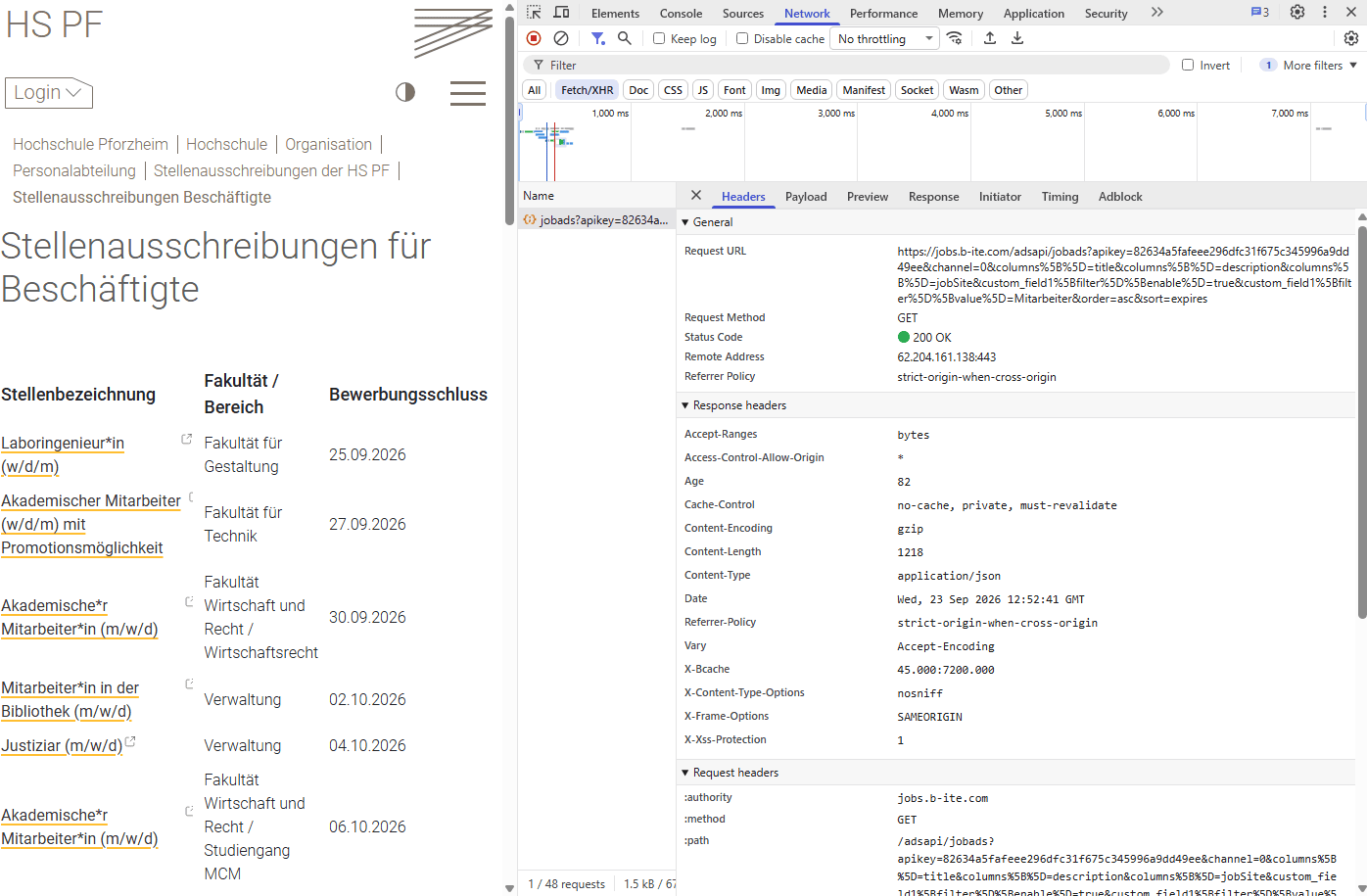
That one discovery is what made the whole project possible. Everything after it was just deciding what to do with that data.
Building the pieces: memory, comparison, and one small side-quest
Once the data source was solved, the shape of the program more or less designed itself:
- Fetch the current list of postings and every individual posting’s full text.
- Compare it against whatever was saved from the last successful run.
- Save the new state as the fresh baseline for tomorrow, but only after a complete, successful fetch. A partial or failed run should never overwrite a good one.
- Only if something is genuinely new, or the text of an existing posting has meaningfully changed, queue up an email. A missing comma or a stray line break doesn’t count.
The “memory” itself is nothing fancy: a state file that lives permanently inside the Hermes container’s data folder, plus a folder of older snapshots and a small log of every run. It survives restarts, and it will survive Hermes itself being rebuilt, as long as that same data folder stays attached.
The one genuinely funny detour was the email address. I wanted a dedicated sender, separate from my own inbox, so I first tried setting up a brand-new Google account. Except — and I only realized this after the fact — I’d registered it using an email address I already had 🙈, hosted somewhere else entirely, instead of creating a fresh Gmail address in the process. Somewhere in there I also had to scan a QR code with my phone and confirm an SMS code sent to a google number. Only after successfully finishing the whole registration did it dawn on me: I wanted a new Gmail address, not just a new Google account. So I deleted the account and went to start over. And this time the QR code and SMS step refused to cooperate, because as far as Google was concerned, my phone number had already been “used” for a signup that same day. Locked out of my own attempt to start over, I gave up on Google entirely and just spun up a proper mailbox on one of my many existing domains through my web host instead. Ten minutes, done, and arguably a cleaner setup anyway: a dedicated address for a dedicated purpose, nothing borrowed from my personal accounts.
The model question: what it cost to build this
Here’s the part that made me sit back a little. To design, build, and debug all of this inside Hermes, I worked with GPT-6-astra at reasoning effort “medium.” By the time everything was tested and running, that one session had completely used up my 5-hour usage window for the day.
If I’m honest, I already suspected GPT-6-astra was overkill for a task this small before I even started. A job this straightforward probably didn’t need a model that heavy, or reasoning effort that high. I used it anyway, mostly because I just wanted to try it. Running straight into my usage limit wasn’t really a surprise at that point; it was more of a confirmation of something I already half-knew.
That stung a bit in the moment, but it also taught me something useful about how I want to think about model choice going forward: building something like this — with all its back-and-forth, its wrong turns, its “wait, that’s not quite what I meant” moments — is expensive in a way that just running the finished thing never will be. The program that checks the job board every morning doesn’t touch a language model at all anymore. It’s a fixed script on a schedule. All the cost was upfront, in the conversation that designed it, not in the years of mornings it’ll spend quietly checking a webpage while I drink my tea.
A different way of building
It’s worth saying that I could have built this entirely differently. Most of the programs I’ve built with AI so far follow the same routine: open a new workspace in Visual Studio Code, brainstorm the file structure and the files themselves with Claude Code (usually Sonnet 5), keep the README updated as I go, push everything to GitHub, and deploy it somewhere external.
This time was different on almost every count. I have my own VPS now, so I can just set up cronjobs directly on it, no separate hosting, no deployment step.
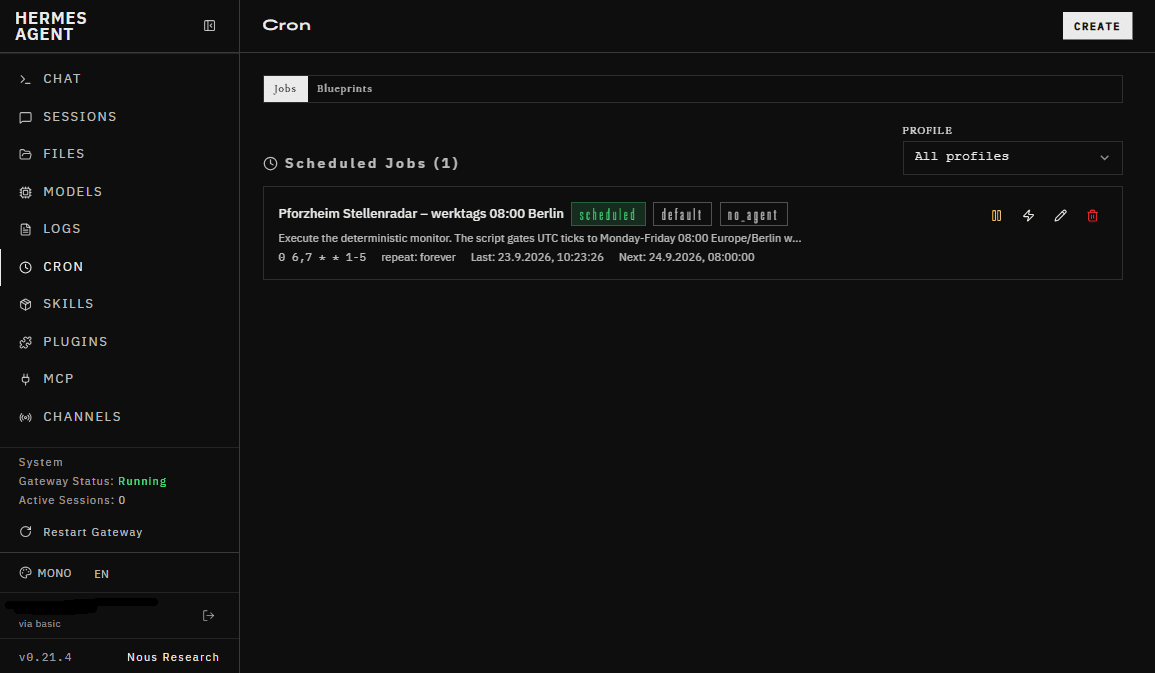
The whole build happened in a chat window, not in a coding interface at all. And the files themselves aren’t backed up yet, and definitely not sitting in a private GitHub repo the way my other projects are.
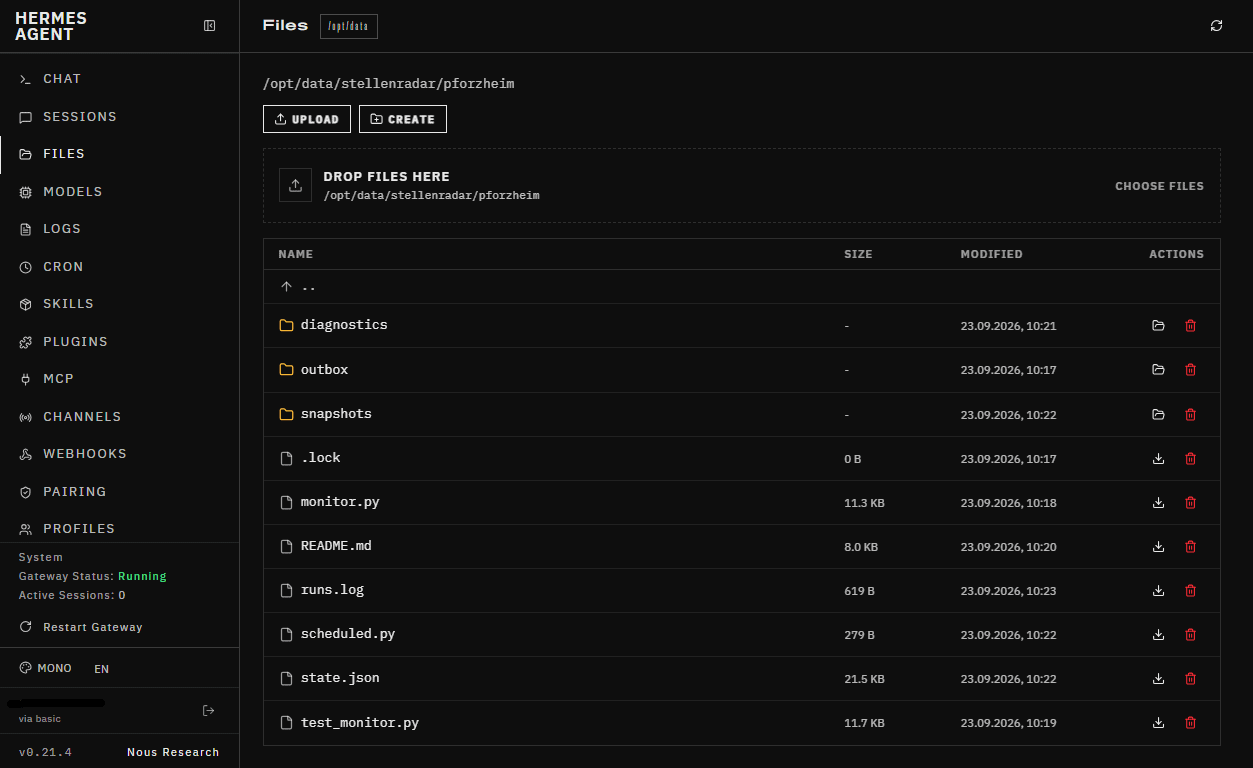
That’s very much still on the to-do list. For now I’m just curious how this plays out, and whether I’ll actually get an email in the next few days.
Where it stands right now
The Stellenradar is live: nine current postings saved as the starting baseline, a scheduled check running weekdays at 8am Berlin time, and a working email pipeline through my own mailbox. I already received a test email, friendly greeting, correct sender, landed where it should. What I can’t yet confirm is the part that actually matters: whether it correctly catches a real change once one actually happens, rather than a test I engineered myself. That’s not something I can force; I just have to wait for the university to post or update something and see what lands in my inbox.
That’s very much in the spirit of this series. Some questions get answered in the same weekend, week, or day. Others get answered by waiting.
What’s next
A few loose ends I’m keeping for later, in no particular order: proper error notifications, so a failed run doesn’t just sit quietly in a log file where I’d never think to look; backups of that data folder, which I still haven’t set up; and, possibly, a much smaller and cheaper model doing light-touch tasks like summarizing what changed, but only once the plain, model-free version has proven itself for a while first.
Sources