There’s a specific kind of defeat that comes from sitting down at your laptop on a public holiday, opening a Coursera course you’ve been meaning to start, and realising after forty minutes that your brain has quietly wandered off somewhere without you.
That was me this Thursday. Linear Algebra for Machine Learning and Data Science. The plan was simple: start the course, get into a rhythm, feel good about it. What actually happened was a lot of staring at a matrix, followed by making tea, followed by more staring.
Maths and I used to be close. That was about twenty years ago, in school, before a decade-plus of industry and self-employment intervened. Now I’m doing a part-time M.Sc. in Artificial Intelligence alongside a full-time job, and the maths module is — let’s say — a challenge that’s proving harder to crack than expected. Not because I can’t understand it in principle. But because sitting down and focusing on it for hours is a skill I apparently need to rebuild from scratch.
So I built a WordPress plugin instead. Obviously.
The Streak Logic
Here’s what I’ve learned about myself: I need external scaffolding to build habits. Left to my own devices, I’ll do a thing enthusiastically for a week and then silently stop doing it.
What’s worked for English is Duolingo. I’m at 275 days. Whether those 275 days have meaningfully improved my English is a separate and somewhat uncomfortable question — but I kept going, which is something. The streak mechanic is absurdly effective at exactly one thing: making you open the app again tomorrow. Not for glory, not for mastery. Just because the number would reset otherwise.
I want that for maths. The Coursera course is four weeks, roughly 28 days. That’s a defined stretch, not an open-ended commitment. I need a dashboard I can actually see, with a streak I can track, and a freeze token system for the days where the job or life just wins and I need to give myself the one-day grace without blowing the whole thing up.
And since I’m rebuilding my website as a proper learning-in-public blog anyway — well, why not build it there, publicly, where at least the accountability is baked in?
Hence: a WordPress plugin.
How It Started: Claude in the Browser First
Before touching a single line of code, I opened Claude in the browser and talked through the project. Not to write code — to think out loud. What exactly do I want this thing to do? What’s the data model? How should the admin interface feel?
This step is underrated. Having a conversation about the architecture before you start building saves you from writing code that solves the wrong problem. I described the streak mechanic, the freeze token idea, the calendar view I had in my head.
Then I asked Claude to turn that conversation into a structured briefing — a prompt file I could hand to Claude Code when I switched over to Visual Studio Code. This is actually one of the more useful things you can do when working across different Claude interfaces.
A quick note on the difference: Claude in the browser is great for open-ended thinking, structuring ideas, and drafting things like this briefing. Claude Code, running inside VS Code, is a proper coding agent — it can read and write files, execute commands, navigate your project structure, and make changes directly to your codebase. They’re different tools for different phases of work.

Into VS Code: The First Session
I created a new workspace in VS Code, opened Claude Code, and started the first proper coding session with the briefing I’d prepared.
One of the first things I told Claude Code: commit everything to GitHub, every time. Not optional, not just when something major happens — after every meaningful change, a commit with a useful message.
Why? A few reasons. GitHub is your undo button when something goes wrong and you need to roll back. It’s documentation of what changed and when. And for a project like this, where the context window in any single Claude Code session is limited, it’s how you preserve the project history even if you start a new chat.
Speaking of context windows — this matters more than people realise. Each session with Claude Code has a finite capacity. The longer the conversation goes, the more of the early context gets pushed out. Which means if you start a new chat mid-project, Claude doesn’t automatically know where you left off.
Claude asked a few clarifying questions about design preferences and database architecture, and then it started building.
Memory Files and README: Don’t Skip This
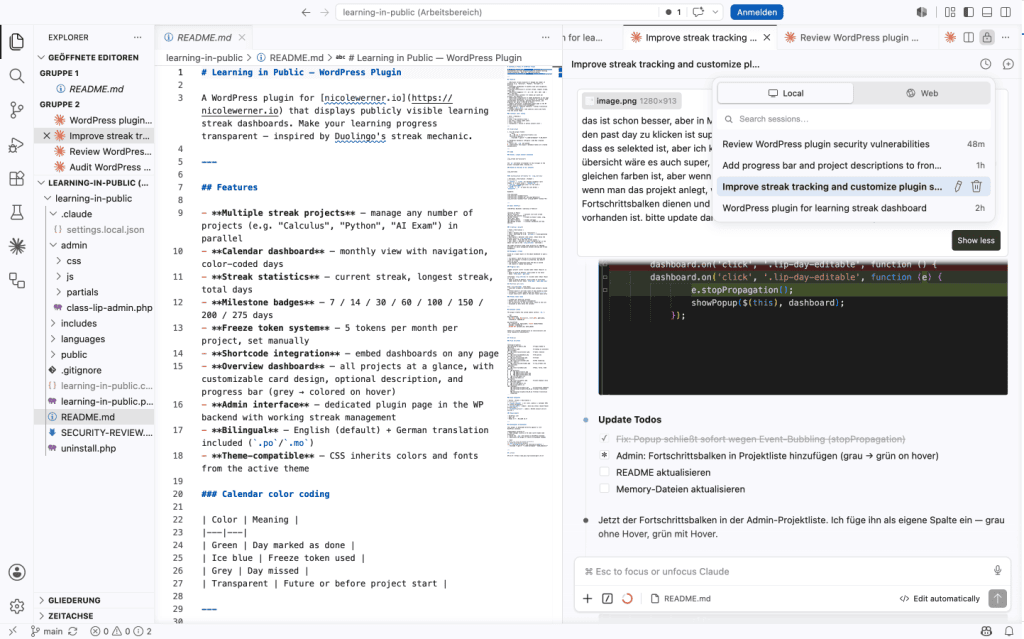
After the first big build run, I asked Claude to do two more things before we called it a session:
First: write a README. Not just for other people — for me, and for Claude. A README that describes what the plugin does, how it’s structured, and how to deploy it forces you to articulate the project clearly. It also becomes a reference document.
Second: create memory files for Claude. These are context files that live in the project and get loaded at the start of each new chat session. They tell Claude: here’s the project, here’s the current state, here’s what we’ve built so far, here’s what’s still open.
This is the solution to the context window problem. Instead of repeating yourself every time you start a new session, you load the memory file and Claude picks up where you left off. If you’re working on any non-trivial project with Claude Code, memory files are not optional — they’re what makes multi-session development actually work.

Live Testing: Upload, Install, Break Things
Once the first version was ready, I zipped the plugin folder and uploaded it to my WordPress installation.
Important caveat: Don’t do this on a live site you care about, with content that matters, with visitors who’d notice if something breaks. My site was starting fresh — zero existing content, zero readers at risk — so it was fine to just throw the plugin at it and see what happened.
This is the right place to test rough first versions. A local WordPress installation or a staging environment works too, but the key point is: real-world testing on production hardware surfaces problems that local testing misses. Caching, server configuration, plugin conflicts — they only show up when it’s real.

Iterate, But Batch Your Changes
Several things didn’t work the way I wanted after the first version. Some of the UI wasn’t right. Some behaviour needed adjusting. The freeze token display needed rethinking.
Here’s a workflow tip that will save you token budget and Claude’s patience: don’t prompt one change at a time. Collect everything that needs changing, write it all in one message, and send it as a single request. Claude can handle multiple changes in one go, and it’s dramatically more efficient than going back and forth for each small tweak.
Also: whenever the chat history gets long and you feel the conversation getting unwieldy, stop and ask Claude to update the README and memory files before starting a new session. Don’t assume it will remember. It won’t. Update the files, start fresh, reload the context.
The Security Audit
Once I was happy with the functionality, I asked Claude Code to do a security audit of the full codebase.
It found things. Not catastrophic things — the core security practices (SQL injection prevention, CSRF protection via nonces, capability checks) were already in place from the start. But there were real gaps: missing date format validation on form inputs, a CSS injection vector via a shortcode attribute, an unparameterised SQL query that used string interpolation instead of prepared statements.
All of them were fixed in the same session. The SECURITY-REVIEW.md file in the repository documents every finding and every fix.
Disclaimer, which I mean seriously: I would not deploy a plugin built this way on any website that actually matters — a business site, a client site, anything with real users and real stakes. Not because Claude Code did a bad job, but because software running in production environments should be reviewed by someone who genuinely understands the code and can vouch for it. This project is fine for my personal learning-in-public site. It’s not a template for production deployment without human code review.
After each change cycle — including post-security-audit — the workflow was: deactivate the old plugin in WordPress, delete it, zip the updated folder, upload, activate again. Slightly tedious, but clean.

What the Plugin Actually Does
In case you want the functional overview:
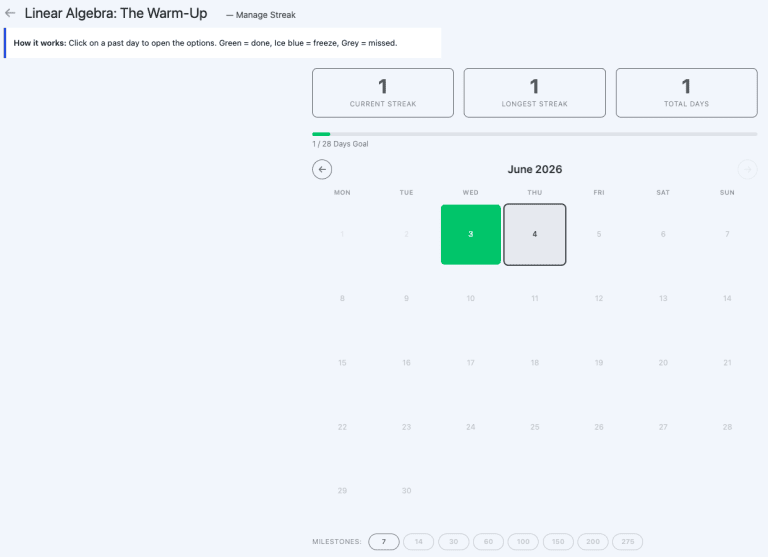
Multiple streak projects in parallel. I can track “Calculus”, “Linear Algebra”, and “AI Exam Prep” as separate projects with separate streaks. Each gets its own calendar dashboard.
Calendar view with colour coding. Green for days marked done. Ice blue for freeze tokens used. Grey for missed days. Each month is navigable.
Streak statistics. Current streak, longest streak, total days completed — all calculated automatically.
Milestone badges. At 7, 14, 30, 60, 100, 150, 200, and 275 days. Slightly vanity-driven, entirely intentional.
Freeze token system. Five tokens per month, per project. Manual — you set them yourself. They don’t carry over. Enough for a rough week; not enough to coast indefinitely.
Shortcode integration. [ lip_streak id=”calculus” ] embeds a single project dashboard on any page. [ lip_overview ] shows all projects at once, with customisable card styling.
Bilingual. English by default, German translation included.

A Few Tips for Working with Claude Code
For anyone who wants to try a similar workflow:
- Start in the browser, move to VS Code. Use the browser interface to think, structure, and brief. Use Claude Code to build. They’re not interchangeable.
- Set up GitHub from day one. Not when the project is “ready” — from the first commit. Claude Code will handle the commits if you tell it to.
- Write memory files early. After every major session. Before you close VS Code. It takes ten minutes and saves you an hour of re-explaining at the start of the next session.
- Batch your change requests. One message, multiple changes, single round trip.
- Ask for a security audit before you call it done. Even for a small personal project. It’s a good habit, and you’ll probably find something.
- Know the limits. Claude Code is a very capable assistant. It’s not a senior engineer with production accountability. For anything beyond personal projects, human review is necessary.
How Much Did This Actually Cost?
In case you’re wondering what a project like this costs in terms of Claude usage, here’s a screenshot from my account settings.
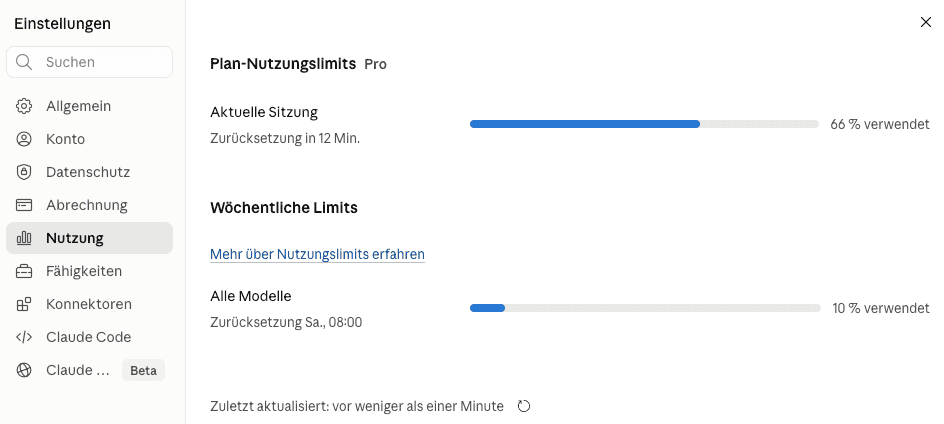
To put that in context: this includes not just the plugin build and the security audit, but also drafting the website copy for nicolewerner.io in parallel. The whole thing — plugin via Claude Code plus this blog post — took roughly two to three hours. For a working WordPress plugin with admin interface, shortcodes, a freeze token system, bilingual support, and a security review, I’d call that a reasonable trade.
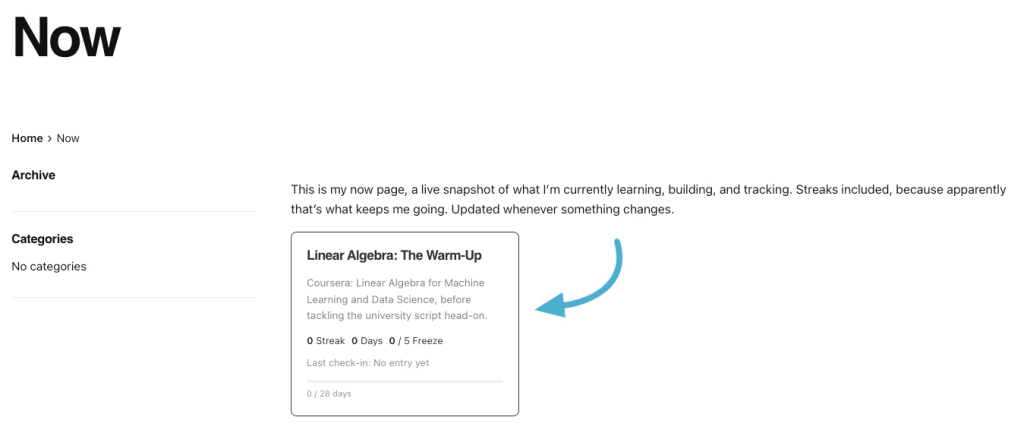
The plugin is running now. The Linear Algebra streak starts today, technically yesterday, but let’s not be pedantic about it.
Twenty-eight days. Let’s see.
A note on process: the ideas, experiences, and opinions in this article are mine. Claude helped me shape them into readable English, which, given that English is not my first language, makes a bigger difference than I’d like to admit.