In my last post I reached the Hermes dashboard on my VPS from a Windows work laptop, with nothing but the built-in SSH client and a browser. So far, Hermes has been running on my ChatGPT subscription. Today I want to add Claude as a second brain. The first question is whether my Claude subscription can do that. The second is how to get the model in without opening anything new to the internet.
Same setup as last time: Windows laptop, PowerShell, browser dashboard. Nothing to install.
TL;DR I added Claude to Hermes with an Anthropic API key, entered through the dashboard in the browser. What this post covers:
- Subscription or API key? A Claude Pro subscription can’t be used. An API key is the supported way. It is billed per token and is separate from any subscription.
- Steps: open the tunnel, sign in to the dashboard, create a dedicated key in the Claude Console, save it under Keys, and pick Claude with
/modelin the Chat tab. - Check: the banner and status bar in the Chat tab, and the usage numbers in the Claude Console.
- Watch out for: the
persist: sessionnote in the model picker, the key expiry date, the key being readable by the agent, and screenshots that show more than you think. - Not in this post: which model fits which agent, fallback providers, OpenRouter, a real cost comparison, and Hermes profiles. I collected them at the end.
A note on how this post came about. Like the last ones, this is a diary, not a security recommendation. My sidekick Claude Sonnet 5 (medium effort) drafted this guide from the Hermes and Anthropic docs, and then I ran through it step by step. Wherever reality differed from the draft, I changed the guide. I can’t judge from the outside how secure the setup is, and nobody has audited it. Don’t put anything on such a server that you can’t afford to lose or leak, and never student data.
Subscription or API key?
| Path | Works with Hermes? | What you pay |
|---|---|---|
| Claude Pro + OAuth | No | – |
| Claude Max + OAuth | Yes, but only with purchased extra usage credits | The extra usage credits. The included Max allowance stays untouched. |
| API key from the Claude Console | Yes | Prepaid credits, per token, independent of any subscription |
| ChatGPT subscription | Yes (last posts) | Covered by the subscription |
The first two rows come from the Hermes provider docs: the OAuth path routes as Claude Code, needs a Max plan plus purchased extra usage credits, and Pro subscribers can’t use it. For everybody else, the docs point to an ANTHROPIC_API_KEY.
Anthropic itself had planned to move Agent SDK and third-party app usage to a separate monthly credit, but paused that change. For now, such usage still draws from the subscription limits. Anthropic says it is reworking the plan, so this can change. Even in the best case, the subscription route means extra credits, so the API key is the simple path, and the only one that works for every plan.
What you need
- The tunnel setup from the last post: SSH key, the
hermes-vpsentry in the SSH config, and the dashboard’s admin username and password. - An account in the Claude Console. Billing there is separate from a Claude subscription, and the subscription includes no API credit.
- Some credit in the Console. If you have none yet, add a small amount under Billing. I’d choose an amount I don’t mind losing, and I’d leave auto-reload off if the option exists, so the balance works as a ceiling.
- A password manager. The key is shown only once.
- A private browser window for the Console on a work laptop, so nothing gets saved.
Step 1: Open the tunnel
Where: Windows PowerShell
ssh -N -o ExitOnForwardFailure=yes -L 4860:127.0.0.1:4860 hermes-vps
Enter the passphrase of the key. Then it looks like it hangs, which is normal. Leave the window open.
Step 2: Sign in to the dashboard
Where: Browser on the Windows laptop
Open http://localhost:4860 and sign in with the admin username and password.
Step 3: Create the key in the Claude Console
Where: Browser, private window, platform.claude.com
An agent can make several model calls for a single message, so cost is the first thing I want to limit. The Console’s sidebar has the key page under Organization settings → API keys. Click Create key.
A dialog appears first: “With identity federation, you don’t need an API key.” Identity federation is meant for cloud and CI providers that issue short-lived tokens. My VPS needs a static key, so I click Continue with an API key. In the form:
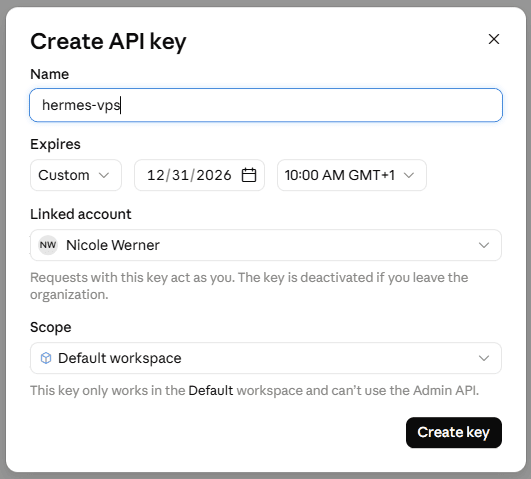
- Name:
hermes-vps. A key just for this server means I can delete only this one later. - Expires: I set a custom date (Dec 31, 2026). A key that expires is safer, but Hermes will then fail with an auth error, so I put a reminder in my calendar.
- Linked account: requests with this key act as me, and the key is deactivated if I leave the organization.
- Scope: Default workspace. The key can’t use the Admin API.
Click Create key, copy the key (it starts with sk-ant-) and save it in the password manager right away.
Two cautions about the key. Hermes can read its own
.envfile, so the agent can see the key, and a prompt gone wrong could leak it. That is why I use a dedicated key with an expiry date and a limited balance. And I never paste the key into Discord, and I blur it in every screenshot.
Step 4: Save the key in Hermes
Where: Browser, Hermes dashboard
- In the sidebar, open Keys. The page has tabs (OAuth, Providers, Tools, Gateway, Settings, Custom Keys). Under Providers, the list of LLM providers shows how many are configured, and for me it said 0 of 16.
- Open Anthropic. It has three fields:
ANTHROPIC_API_KEY,ANTHROPIC_TOKENandANTHROPIC_BASE_URL. I only fill the first one and leave the other two empty.
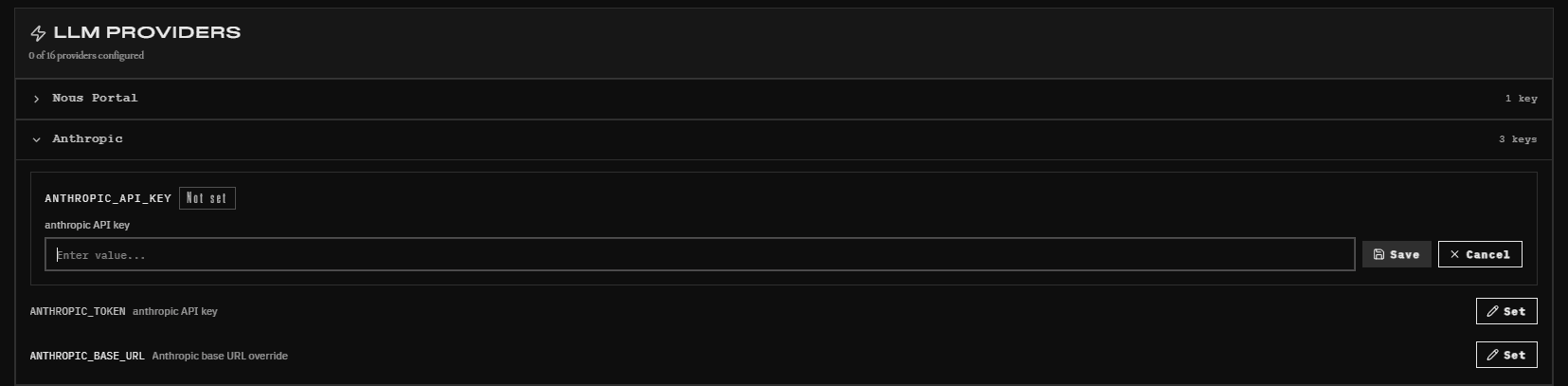
- Click Set next to
ANTHROPIC_API_KEY. The field says “Not set”. Paste the key without spaces at the start or the end and click Save.
The dashboard writes the key into Hermes’ own .env file in the data folder, not into the Environment section of the Docker Manager. So it survives redeploys, and the two places don’t overlap.
Step 5: Pick Claude
Where: Browser, Hermes dashboard → Chat tab
- Open a New chat and type
/model. Anthropic now shows up in the provider list as configured (for me: “Anthropic · 14 models”). I didn’t need to restart anything.
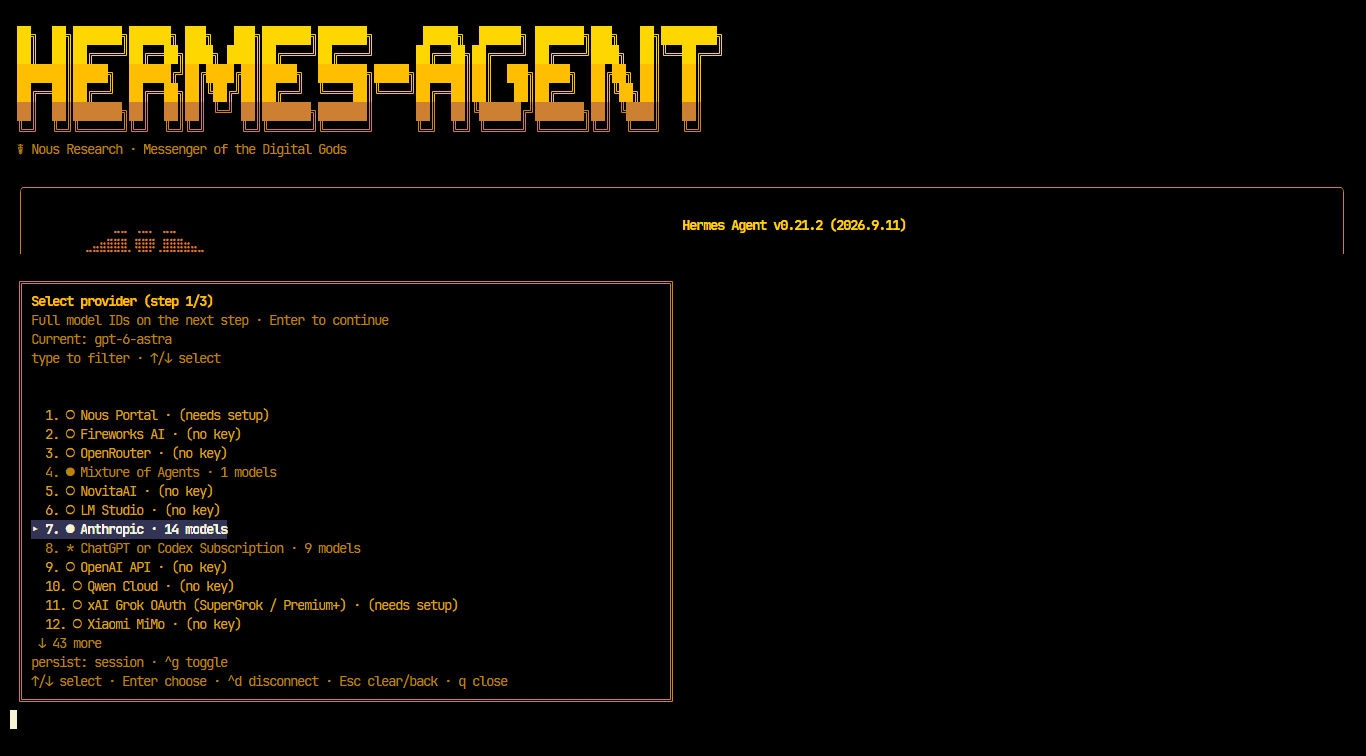
- The picker has three steps. Step 1 is the provider: Anthropic. Step 2 is the model. The list starts with
claude-fable-5.1,claude-fable-5andclaude-opus-5, followed byclaude-sonnet-5and older versions. I takeclaude-sonnet-5, because the agent makes several calls per turn and I don’t want to start with the biggest model.
- Step 3 is the reasoning effort, from minimal to ultra, or none. Medium is preselected, and I keep it. Higher effort means more thinking tokens, so it costs more.
- Look at the footer of the picker: “persist: session · ^g toggle”. The switch only applies to this session unless I toggle persistence with Ctrl+G. So my default model stays
gpt-6-astra, and as far as I can tell, Discord keeps using it too.
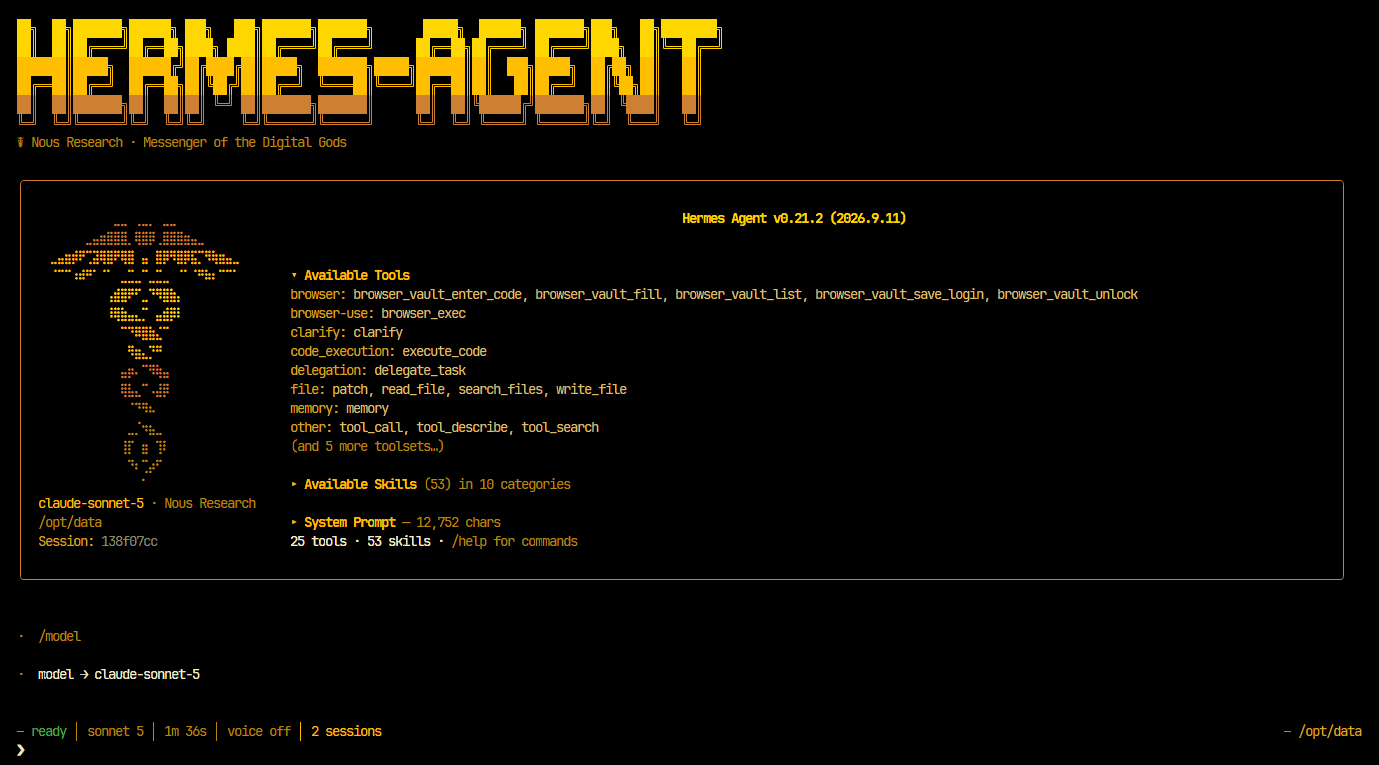
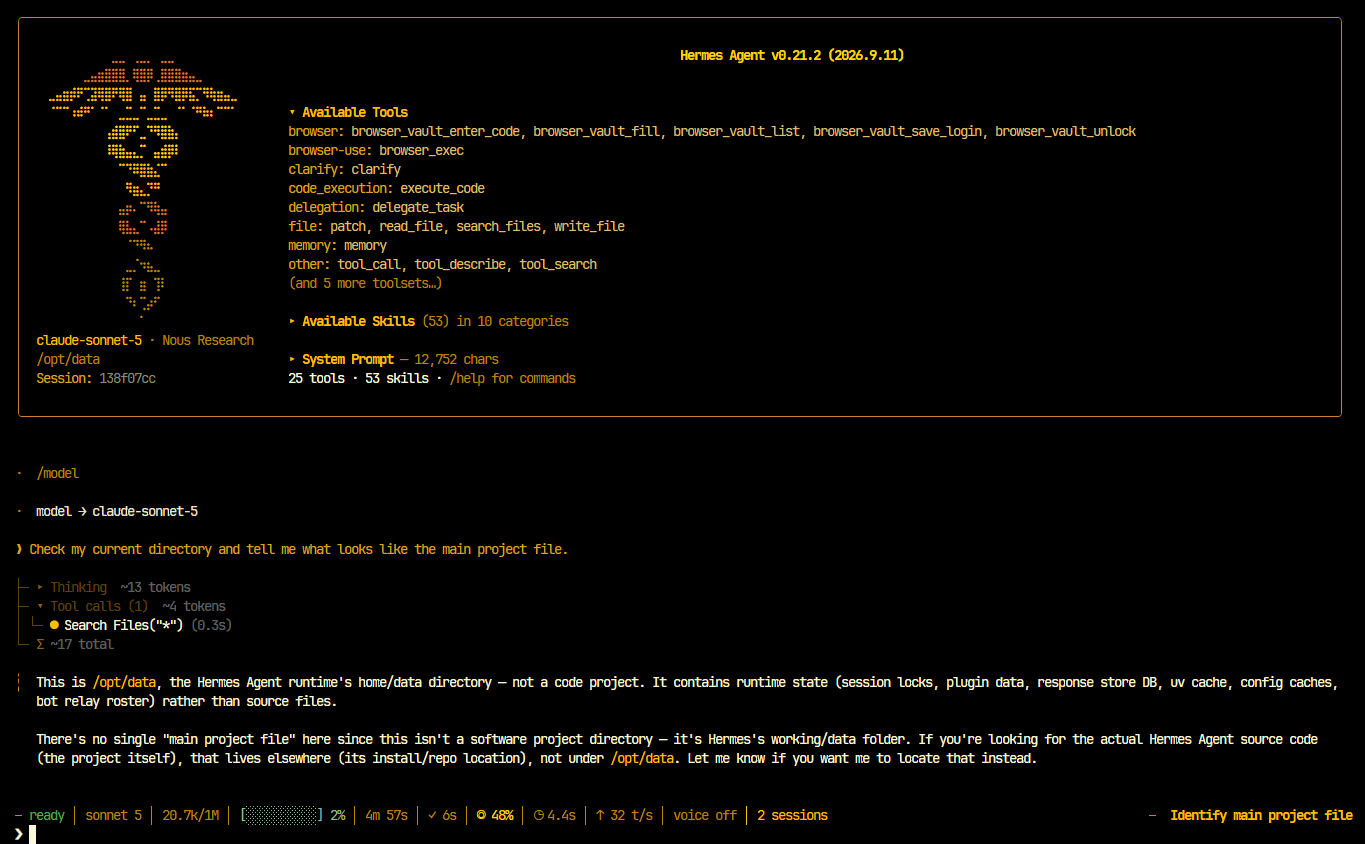
Afterwards the banner shows claude-sonnet-5 and the status bar says sonnet 5. The banner also says “Nous Research” next to the model. As far as I can tell, that is Hermes’ branding, not the provider: Nous Portal still says “(needs setup)” in my provider list, so nothing can be running through it.
Step 6: Check that it really is Claude
Asking a model who it is isn’t reliable, so I check three places.
1. The Chat tab. I send the test prompt from the last posts:
Check my current directory and tell me what looks like the main project file.
Hermes made one tool call on its own (Search Files("*")) and answered that /opt/data is the Hermes runtime’s data directory, not a code project. That is the same conclusion as with ChatGPT. The status bar shows sonnet 5, about 20.7k of 1M tokens of context used (with ChatGPT it was 13k of 272k), a cache hit share and the speed in tokens per second.
2. The Claude Console. This is the number that counts, because it is the bill:
- The API keys list has a Cost column, so the spend of the
hermes-vpskey shows up right there. - The credit balance is shown at the bottom left of the sidebar.
- The Usage page breaks usage down by model and API key, and there is a Cost page as well. They aren’t listed under Organization settings in my sidebar, but
platform.claude.com/usageandplatform.claude.com/costopen them directly.
3. Hermes’ own Analytics page. I wouldn’t rely on it, see below.
Where I got stuck
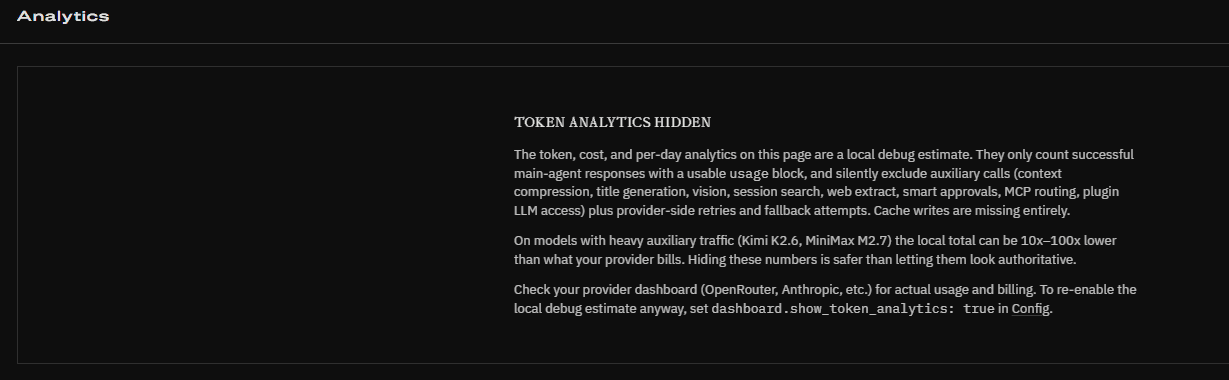
- I couldn’t find the Analytics page. The Hermes docs describe one, but there is no entry in my sidebar. Opening
http://localhost:4860/analyticsdirectly shows it, with the title “Token analytics hidden”. Hermes explains why: the numbers are a local debug estimate. They only count successful answers of the main agent. Auxiliary calls (context compression, titles, vision, session search, web extraction, approvals, MCP routing, plugin access), retries and fallbacks are missing, and so are cache writes. On models with a lot of auxiliary traffic, the local total can be 10 to 100 times lower than the real bill. Hermes points to the provider’s dashboard for actual usage and billing. The page can be switched on anyway withdashboard.show_token_analytics: truein Config, but I left it hidden and use the Console instead. /usagedidn’t show any costs. In the dashboard chat, the command jumps to the Sessions page. That page shows counts (sessions, messages, sources) and the connected platforms, but no cost.- The Console sidebar looked different from what I expected. There was an extra dialog about identity federation, and Usage and Cost weren’t under Organization settings (see steps 3 and 6).
Note for later: one profile per model?
I left this out of the steps on purpose, but it is my next question. The /model switch only lasts for the session (?), and the default stays on ChatGPT. A cleaner idea might be Hermes profiles: one profile per model, each with its own config, .env, sessions and memory, and each profile as its own Discord bot. Here is what the docs say:
- Each Discord bot needs its own token. A bot can only belong to one profile, and a second profile with the same token gets blocked. So every profile means its own application in the Discord Developer Portal.
- A restart may not be needed. The docs on running many gateways say a new profile’s Discord adapter starts as soon as its config carries a bot token, without restarting the other profiles.
- Untested here. Whether this works in my Docker container from the Hostinger template is an open question. That deserves its own post.
What’s next
- Which model for which agent, and what it all really costs.
- Profiles as separate Discord bots, each with its own model.
- OpenRouter for open-source models.
- Fallback providers, so Hermes switches over if one provider fails.
- Backups and updates for the server, and a plan for renewing the API key before it expires.
- What Hermes is allowed to do. Approval mode and tool permissions.
- ….
Sources
- Hermes Docs: LLM and Model Providers
- Hermes Docs: Web Dashboard
- Hermes Docs: Profiles
- Hermes Docs: Running Many Gateways at Once
- Claude Help Center: Claude Agent SDK with your Claude plan
- Claude Help Center: Cost and usage reporting in the Claude Console
- Claude Help Center: Workspaces in the Claude Console